Tank Controller Manager
Abstract
This project aimed to increase the ease of use of the Tank Controller Manager Web Application by fixing minor issues and adding new functions. Written using the dart language and flutter application framework, project tools such as Github automated testing a code linter, and improved documentation were added to increase the ease of use for current and future developers on the project. Application functions such as authenticating valid IP addresses, shortcuts to edit tank controller settings, and enabling file upload were also developed for the convenience of the end users. These additions will increase the ability of future developers to make additional changes to the project, and give users of the tank controller web application a more streamlined way to interact with the device it connects to.
The Purpose of the Project
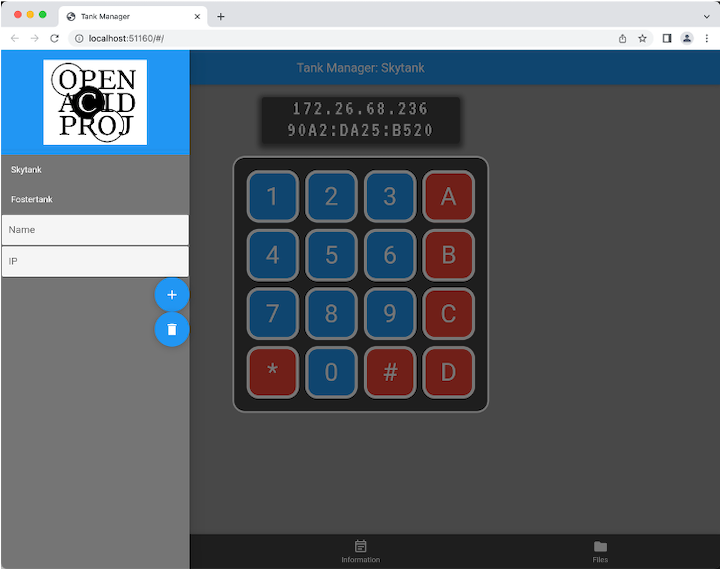
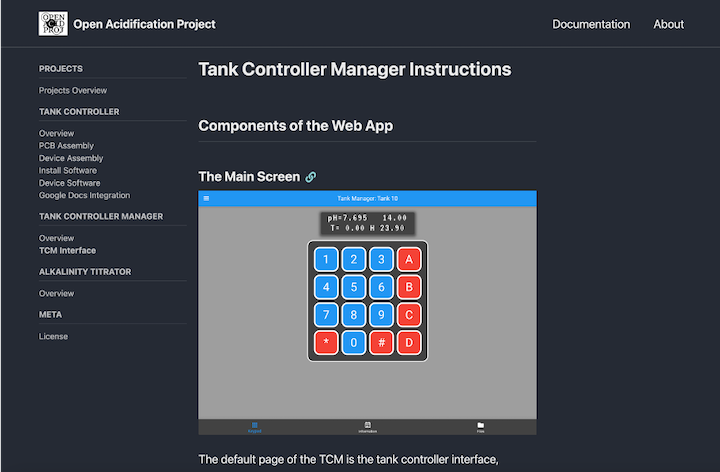
The tank controller mamanger is a web application written in Dart and running on the Flutter framework that simulates a physical tank controller interface by displaying a replica of the controller’s keypad and LCD on a webpage. This is a project in progress for the use of Dr. Kirt Onthank of Walla Walla University’s Biology department. The webpage can currently be used to directly connect to and interface with Dr. Onthank’s tank controllers by entering their IP address and using the keypad and display shown to enter commands and receive output in the same manner as the physical controller. Interacting with this interface can be tedious at times, so one of the goals of the project was to add shortcuts. Another goal was to add data processing and graphs to the web app, and the final goal was to work on any existing issues that may exist or prove to be roadblocks for the first two goals.
Development and Improvement
Over the course of the two quarters that I spent working on this project, my actual work was usually far off course from what I had originally envisioned my project to be. The first 5 weeks of the project were spent on standing issues and requests, as well as minor improvements to the autonomy of the project. The first feature added to the project was the addition of a button that would remove the currently selected tank from the current tank list. Prior to this, tanks could be added to the list seen on the left side of the screen, but could only be removed if the webpage was refreshed, which clears the entire list. At the same time as writing this new feature, I also added GitHub automation to the project, as none of the tests associated with this project would run when pushed to the repository. While doing this work with testing and writing a new test to verify that the remove tank function worked correctly, I ran into a new issue. Some of the tests in this project were dependent on previous tests to pass, so could not be run independently. As this is a bad coding practice, I rewrote the offending tests, as well as refactored existing tests to be more streamlined.
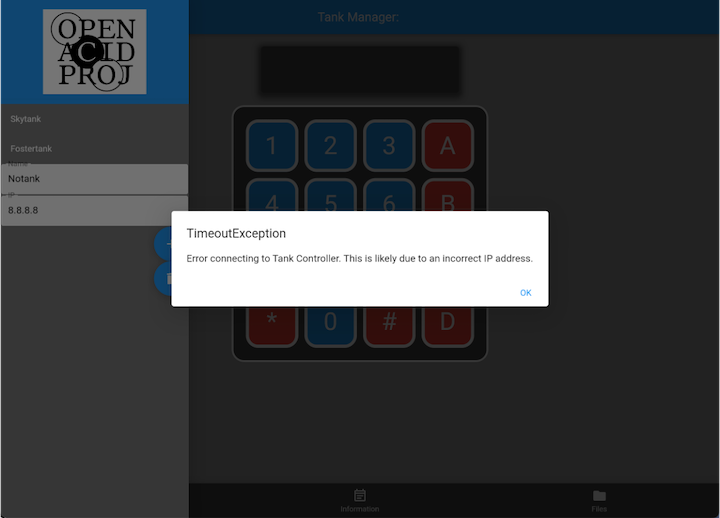
The first major feature I would add to the project was the IP Check feature. This would run when a new tank was added to the list, wait for a response from the IP address entered, and if it did not return a response from a tank controller, it would display an error and not add that address to the tank list. This part of the project took 4 weeks to implement, as I constantly ran into new bugs and errors every week. Once the feature was added, an error would prevent it from working, which needed a week to find and fix. This would then bring up another error, and the cycle repeated for those 4 weeks. This was by far the greatest challenge I faced during this project. Eventually, I had this working and with a test to verify it by Spring Break.
Over Spring Break I was not able to access my testing tank controller as I was outside the WWU network, so I instead spent time on adding a linter to the project. For those unfamiliar with the term, a linter is a code analyzer that looks over project files for errors, stylistic problems, and bad coding habits. While the default linter for Dart is quite handy, I made sure to look through the entire list of rules in the Dart linter documentation to pick out rules that would be of use specifically for this project. Two of the ones I found of the most use were the discarded_futures rule and the unawaited_futures rule. These two rules dealt with the use of asynchronous functions, the first states that you can not call an async function while in a non-async function, and the second requires you to mark all async functions with the await keyword if the program must wait for the function, or the unawaited keyword if the program can continue. Since this web application makes use of async functions and awaits quite often, this would make future coding much easier as errors can spring up when these rules aren’t enforced.
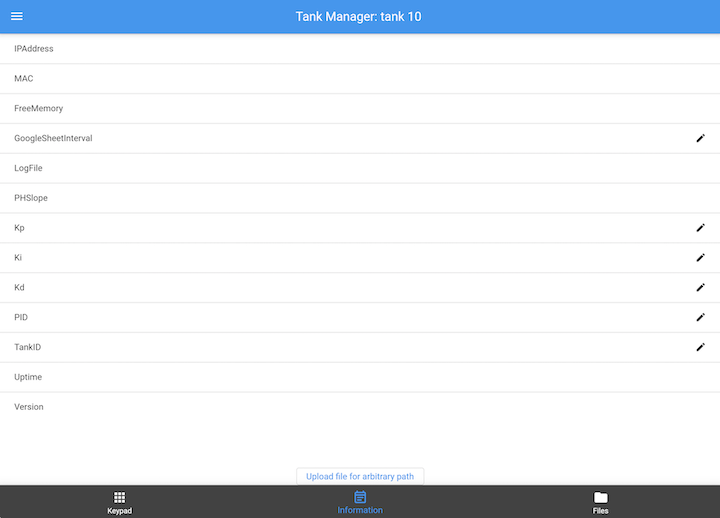
The next two major features I would add were the UI shortcuts that I had originally wanted to add at the beginning, and a file upload feature. At the time of writing this post, neither one are fully supported by the tank controller itself, so are locked behind a version check function that only allows full access to them if the version number sent by the tank controller is above a certain version. As seen in the picture above, both of these functions are not on the main page of the web app, but on the second Information tab. This screenshot shows a tank controller which meets the version number requirement, and so edit markers are placed on the right side of all fields which can be edited. All that needs to be done is to click on the field, enter a new value into the popup that appears, and then press enter. A tank controller that does not meet the version requirement will not have edit markers, and clicking on the fields does not do anything. At the bottom center of the screen is a button that allows file uploads. These are limited to .txt and .csv files of 10KB or less. Clicking on it will bring up a standard file select screen. On an unsupported controller, this button will still appear, but clicking on it will only show a popup saying that the current tank controller does not support the feature yet. Due to one of the quirks of Dart not allowing if statements in certain parts of the code, this was much easier to implement than the removal of the button entirely.
My last two additions to this project were in the forms of much needed revisions to the documentation of the project, and an update to the Open Acidification Project website itself. When I had initially started this project, the documentation provided in the README was largly unhelpful, as it only pertained to development of the web app on an Android platform. With my project mentor’s direction, I was able to locally set up, run, and debug my project in an efficient manner. To prevent other developers needing to get direct help with setup, I added explicit and detailed instructions as to what software was needed to develop and run this project, as well as how to install and run it locally. I also included several helpful commands from running tests and the linter, as well as an explanation as to how our GitHub repository works, a link to the currently deployed web app, and how to contact a project manager in order to get a new version of the web app released. This should greatly help any future developers of this project.
The website of the overall project was not something I planned on even touching when I started this project, but I decided to do so after seeing that the only mention of this project on the site was a single line documenting the year that a student created it as a senior project. I decided that this was not fair considering that it has been a senior project at least three times now, so I added it to the main landing page of the website along with the Tank Controller and Alkalinity Titrator projects, and made a new documentation section for it on the website. Like the equivalent sections for the other two projects, the documentation gives first a brief overview of the project before going into a detailed explanation of each tab and feature of the web app. I quite enjoyed writing it, and it was a very nice way to add a personal touch to another visible part of the project.
Closing Thoughts
Over the course of this project, I was able to greatly increase the functionality of the Tank Controller Manager by adding new features and solving issues that had been causing headaches. I was able to get valuable first hand experience with a real world project and how they are worked on. In addition to this experience, it was also quite fun. I enjoyed working for hours on an issue or feature for the payout at the end when it finally worked as intended, or when writing documentation knowing that the next person to pick up this project would be grateful that someone else took the time to explain it carefully.